Everything BatSwing does, and how far along it is.
Batting and bowling, side by side. Each feature says whether it's Live, a Pilot feature, a Preview or Coming next, and whether the coach tags it or it happens automatically.
- Live
- Works today in the product.
- Pilot
- Built, not yet validated on real footage.
- Preview
- Made by our team from one public nets clip. Not in the app yet.
- Coming next
- Not built yet.
Batting and bowling, side by side.
Coach and share
- PilotFocus
- PilotTeaching clip
- LiveA report with your logo
- LiveDrills and access
- PilotFocus
- LiveA bowling report with your logo
One phone, in 3D
- Preview3D estimate batting first, bowling next
Bowling never shows a speed or an angle, never tracks the ball, and never calls an action legal or not: the coach confirms each delivery and tags where it landed. Which features need one phone or two
Record and split
One phone, one recording per player. BatSwing splits it; the coach confirms.
Ball splitting with one‑tap confirm
One continuous side-on recording per batter, up to about 10 minutes, split into balls automatically. BatSwing listens for bat on ball and watches the downswing. The coach reviews the detected balls, drops a false one or adds one it missed.
Then a one-tap ball sheet: middled, edge, beaten, missed, left (good or poor) or unknown. The computer suggests, the coach confirms. A suggestion never counts until the coach taps, and the latest tap wins.
Ball by ball, as the coach confirmed them
- Left alone, counted separately
- 2
- Not confirmed by the coach, so not counted
- 3
One bowler, one clip, split into deliveries
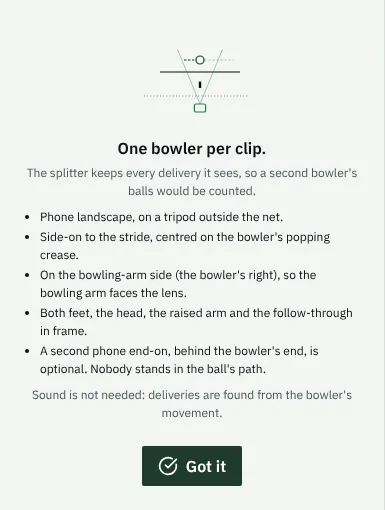
The coach films the whole spell side-on from the bowling-arm side, up to about 10 minutes, one bowler per clip. BatSwing finds each delivery from the bowler's movement, so sound is not needed.
The coach reviews the deliveries it found, drops a false one or adds one it missed.
Tested on demo data and broadcast clips so far.
The frames that matter
BatSwing offers the frames; the coach picks or confirms them.
Key frames, suggested and confirmed
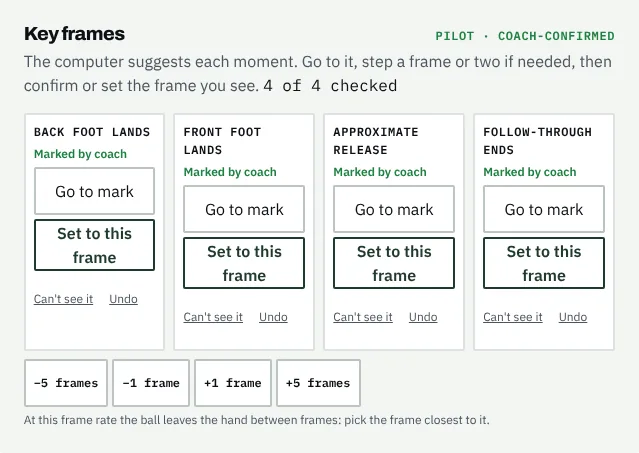
Four moments of each delivery: the back foot lands, the front foot lands, the approximate release and the end of the follow-through. BatSwing suggests each one. The coach goes to it, steps a frame or two if needed, and confirms it or marks it as not visible.
Suggestions hold up on clear side-on video; filmed through a net, the coach marks more of them.
Where it met the bat (coach-marked)
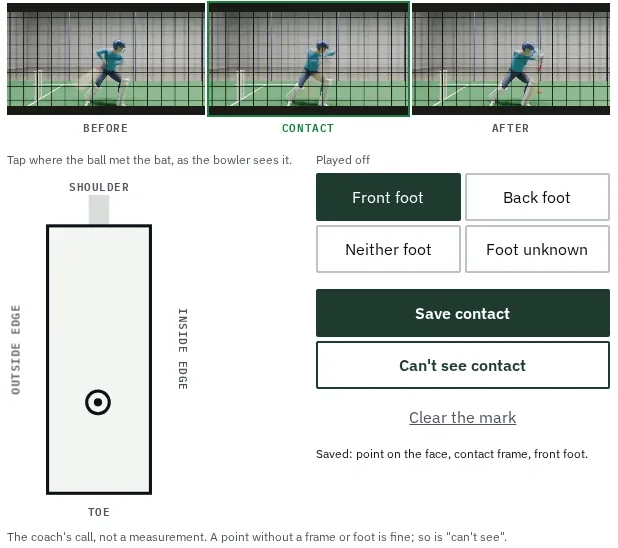
BatSwing offers the frames around each shot. The coach picks the contact frame, taps where the ball met the bat face and says which foot it was played off.
Over a session the marks build up on one bat, by foot and by drill, with the unknowns counted. The coach's call, not a measurement.
Pilot feature. On real recordings the suggested frame is only a starting point.
Where it went (coach-tagged)
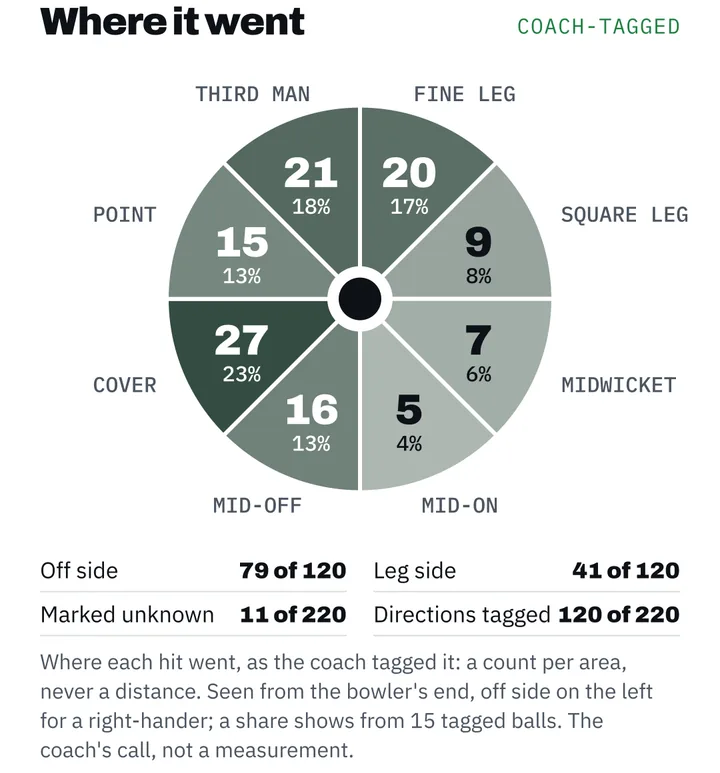
On the ball sheet the coach taps which of eight areas each hit went to, or marks it unknown. BatSwing counts them per area, seen from the bowler's end and mirrored for a left-hander.
A count per area, never a distance. A share shows only from 15 tagged balls. The coach's call, not a measurement.
Pilot feature. Tried on demo data so far, not yet on an academy's sessions.
Where it landed (coach-tagged)
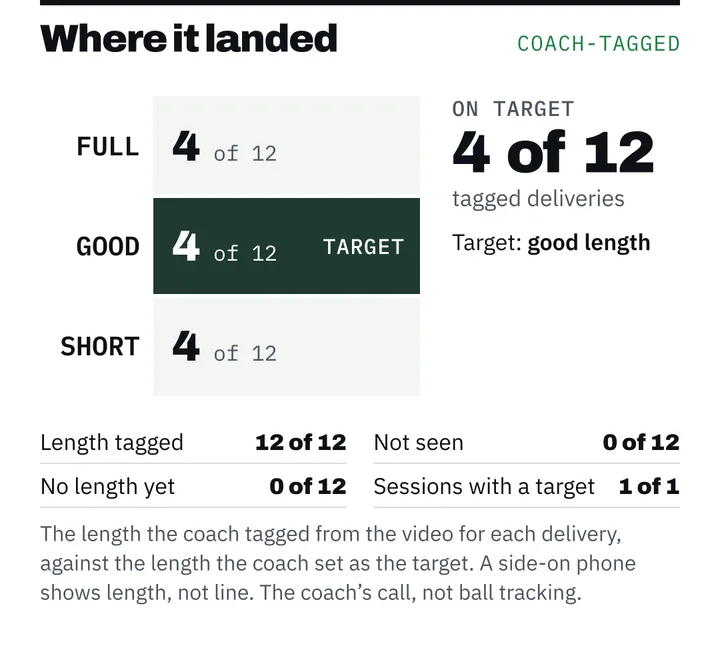
For each delivery the coach tags the length it landed on (full, good or short) or marks it not seen. BatSwing counts them against the target the coach set. A side-on phone shows length, not line.
The coach can also note where the front foot landed against the popping crease: behind, on or over the line. The coach's call, not ball tracking and not a no-ball call.
The coach's call, not ball tracking. Shown on demo data.
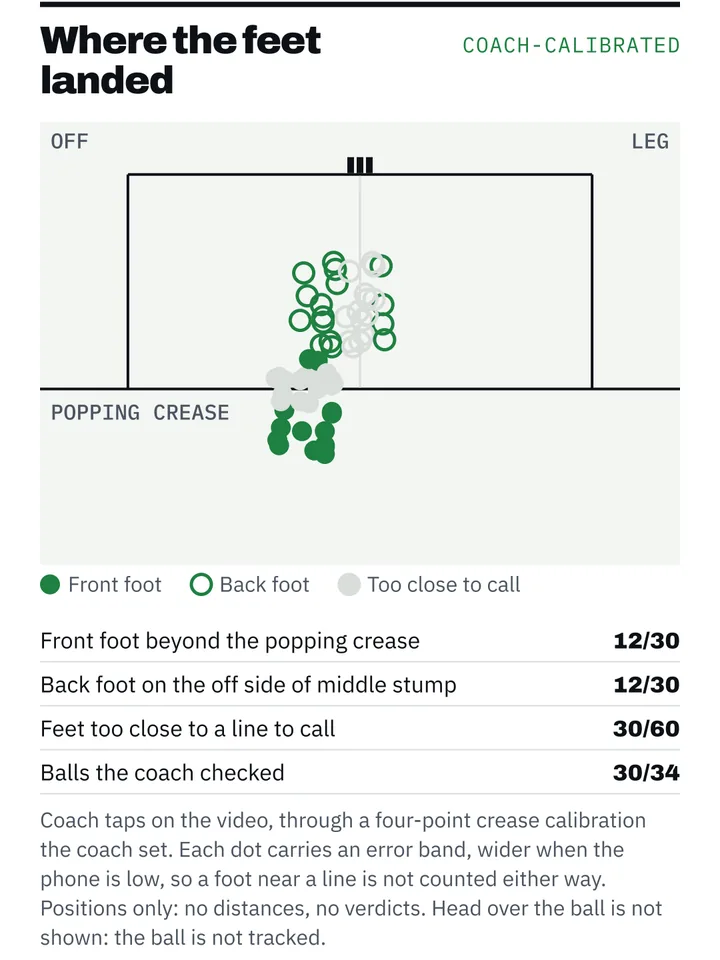
Footwork vs crease (coach-calibrated)
The coach taps the four corners of the crease once per session, then marks where each foot landed. BatSwing shows the marks against the popping crease and the middle-stump line, as counts.
A foot too close to a line is not counted either way. Positions only: no distances. It needs a still, raised phone that sees the whole crease.
Pilot feature. Tested on demo data only; needs that phone position at an academy next.
Progress over time
Counts that build up session after session, with their denominators.
Progress and trends
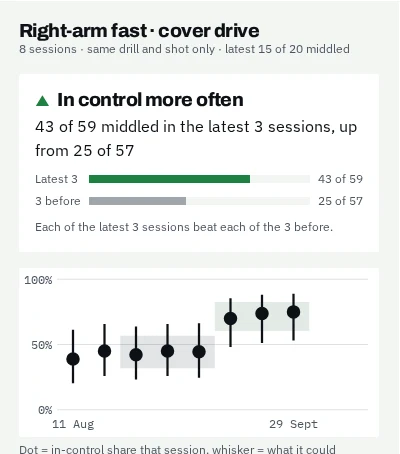
Control by drill, session after session, always with its denominator: "15 of 20 attempted balls middled". Leaves are counted separately, because a good leave is a good decision. Every trend links back to the clips behind it.
A trend arrow appears only when all five hold:
- The latest 3 sessions are compared with the previous 3, not one good day.
- Each of those sessions has 15 or more attempted balls.
- The drill is the same: shot, bowling, length, feed and pace.
- The ranges don't overlap, and every recent session beats every earlier one.
- There's no camera or software change in between.
Otherwise it says which applies: not enough data, change not yet clear, or withheld.
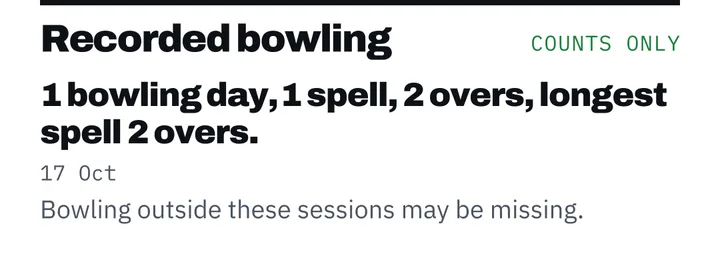
Recorded bowling, beside your guideline
Confirmed deliveries add up to bowling days, spells and overs. On the coach's screen they sit beside the junior bowling guideline the academy chooses. In Australia and the UK it starts on Cricket Australia's or the ECB's; elsewhere the academy picks one.
It counts what was filmed, so bowling outside these sessions may be missing.
A record of filmed sessions, not a full workload record.
Watch back and compare
Pictures to watch together, not measurements.
2.5D replay
Cut-outs from the real frames, layered with gentle parallax, so a coach and player can revisit a ball together. Trails follow points on the body and the bat. The bat trail is left out when the detector isn't sure, rather than guessed.
It says what it is on screen: "2.5D replay from one camera. Not a 3D measurement."
Real footage, public nets clip, as filmed through the net. The 2.5D replay is made from recordings like this one.Footage: CoachCricXI on YouTube
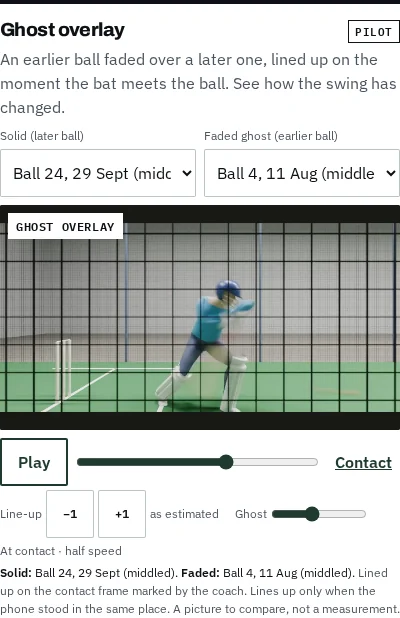
Ghost overlay
An earlier ball faded over a later one, lined up on the moment the bat meets the ball, so a player can see how the swing has changed. A picture to compare, not a measurement.
Pilot feature. Lines up only when the phone stood in the same place both times.
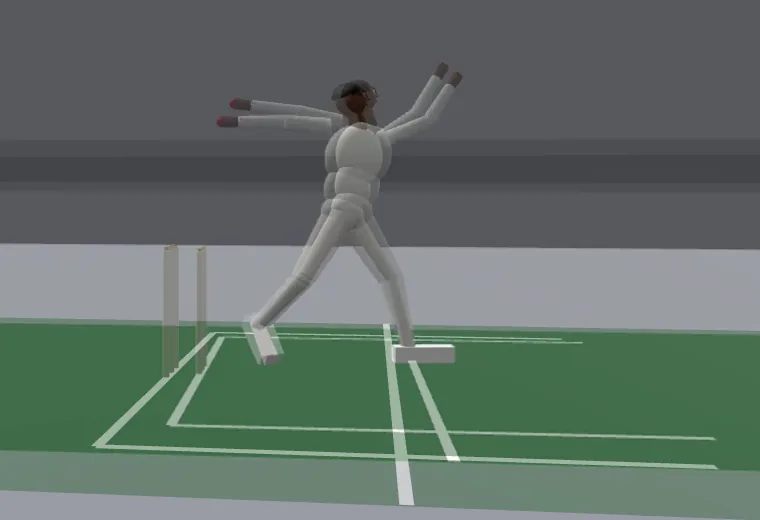
Ghost overlay for bowlers
An earlier delivery faded over a later one, lined up on the moment the front foot lands. If the phone stood nearer or further away, the earlier picture is sized to pin the front foot. A picture to compare, not a measurement.
If the phone moved, the bowler lines up but the ground may not.
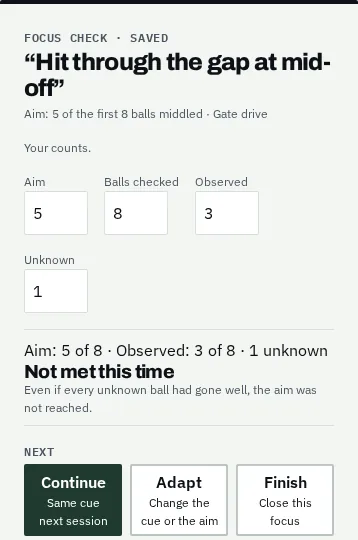
Focus: one cue, checked next session
The coach sets one thing to work on, with a drill and an aim. It is on the coach's screen before the next session. Afterwards the coach enters what they saw: balls checked, the aim met or not, and any they couldn't see.
Unknown balls stay in the count, so the outcome reads met, not met or unclear. The player sees what they are practising, what happened and what is next.
Pilot feature. For bowlers, the Focus is carried onto the bowling report. Email updates to players are not switched on yet.
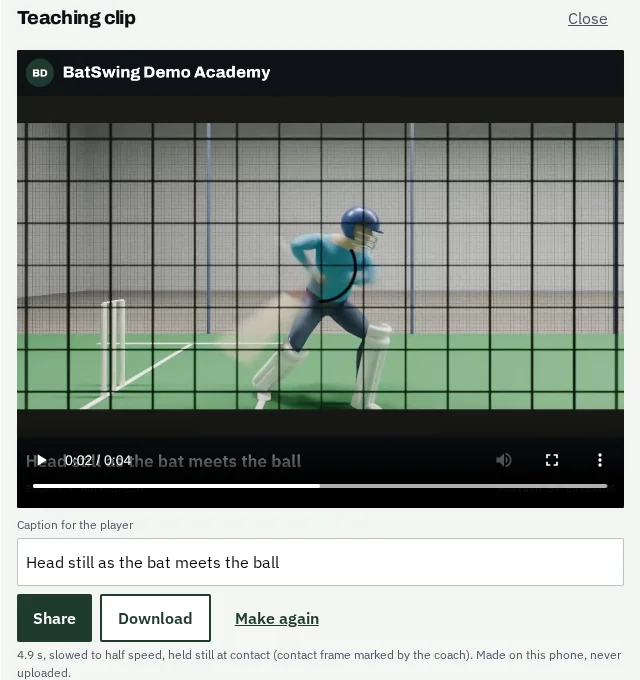
Teaching clip
One ball, slowed down and held still at the moment of contact, with the coach's caption and your academy's name on it. Made on the coach's phone and sent from its share sheet, to WhatsApp or any messaging app.
Pilot feature. Not yet checked in WhatsApp on real Android phones and iPhones.
A report with your logo
Your academy's logo up front, BatSwing as a small "powered by" mark. It leaves the app only once the coach approves it: as an image, a PDF, or a private link that expires and can be revoked, through WhatsApp or any messaging app. Parents can get a simpler version in plain words.
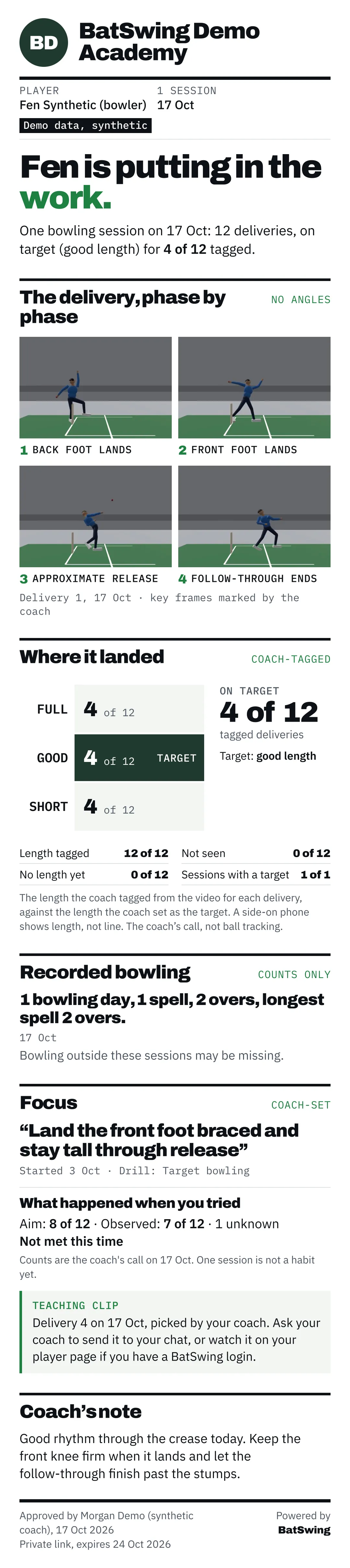
Live today: the branded image and PDF, coach approval and the expiring link. Shown here is the new report design, on demo data. Its newer sections are pilot features or not in the product yet; Where it pitched is the coach's tag, not a measurement.

A bowling report with your logo
The same branded report, for a bowler: the four key frames of one delivery, where it landed against the target, the recorded bowling, the Focus, and the coach's note. It leaves the app only once the coach approves it. Parents can get a simpler version in plain words.
Shown here on demo data.
Drills and access
Breakdown by drill and type of bowling
Progress is split by the drill the coach picks: the shot, the type of bowling (for example right-arm fast or spin), length, feed and pace. A cover drive against the machine isn't mixed with a sweep against spin.
Player and guardian access
The coach invites a player to see their own sessions, counts and trends. For a player under 18, the coach invites a parent or guardian instead. Access is read-only, and a player or guardian can only see their own student's sessions.
Bowlers see their own recorded bowling too.
Two phones
What a second, front-on phone adds.
Two-angle synced playback
Add a second phone front-on, behind the bowler's end. BatSwing lines it up with the side-on phone using the sound of bat on ball, and each ball plays back from both angles in sync.
Pilot feature. Sync thresholds are not yet validated on real footage. The extra set-up
See the shot from any side
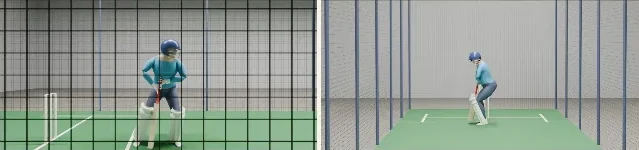
With a second phone, a view of the batter's pose that the coach can turn round and look at from the off side, the leg side or the bowler's end.
Not built for real recordings. The preview here is simulated on demo data: nobody's video went into it.

One phone, in 3D
A first look at a real batter in 3D, made from one phone video.
3D estimate from one camera
From one phone video, BatSwing wraps the player's own video onto a 3D estimate of their body, so the real gloves and bat show. In the viewer, drag to turn it, zoom and pan.
It stays near the camera that filmed it, because one camera cannot judge depth well. The yellow ribbon is the bat's path, dashed where the bat was a blur. A preview, not a measurement: no numbers, never in a report.
Not in the app yet: one library clip. Bowling comes next.
The same shot, replayed phase by phase
The replay pauses at stance, backlift, stride, impact and follow-through. The pose skeleton, where each foot landed and the bat's path are drawn over the same 3D estimate. The bat's path is a yellow ribbon with a thin ink edge; it is dashed where the video shows the bat only as a blur, so that stretch is an estimate, not something the camera saw.
Same library clip, same limits: shapes only, no numbers, never in a report.
Also coming next
Named here so you know they are not built yet.
- Coming next Direction suggestions
- BatSwing suggests where each hit went, from the video, for the coach to confirm. Today the coach tags it.
- Coming next Contact suggestions from 120 fps
- A suggested contact point from slow-motion recordings, for the coach to confirm. Today the coach marks it.
- Coming next Head over the ball
- Needs to know where the ball is, and one phone does not follow the ball today.
- Coming next Line and length
- A side-on phone can't measure where the ball pitched, so we don't show it as a measurement. Only once it is tested on academy footage.
- Coming next Automatic bowling-type detection
- Today the coach picks the drill and the type of bowling.
- Coming next Landing suggestions for bowlers
- BatSwing suggests where each delivery landed, from the video, for the coach to confirm. Today the coach tags it.
- Coming next The bowling action, in words
- The front knee from landing to release and the head at release, read in words and counted, for the coach to confirm. No angles, and never a call on whether an action is legal.
See it with your own drills.
A 20-minute call. No footage or player details needed to book.
Book a demo →